
Data
The canonical model says what a customer is. Master data is the customers themselves: the official list, with one record for each.[1] Gartner describes master data as what identifies and describes the core entities of an enterprise, used across many business processes: customers, suppliers, sites, and the chart of accounts, among others.[2]
The problem appears when each system keeps its own list. The same customer is in the sales system, in billing, and in the online store, written three different ways. They are three records and one person. Any count of customers is wrong before the analysis even starts, and an AI agent will treat them as three different people.[1]
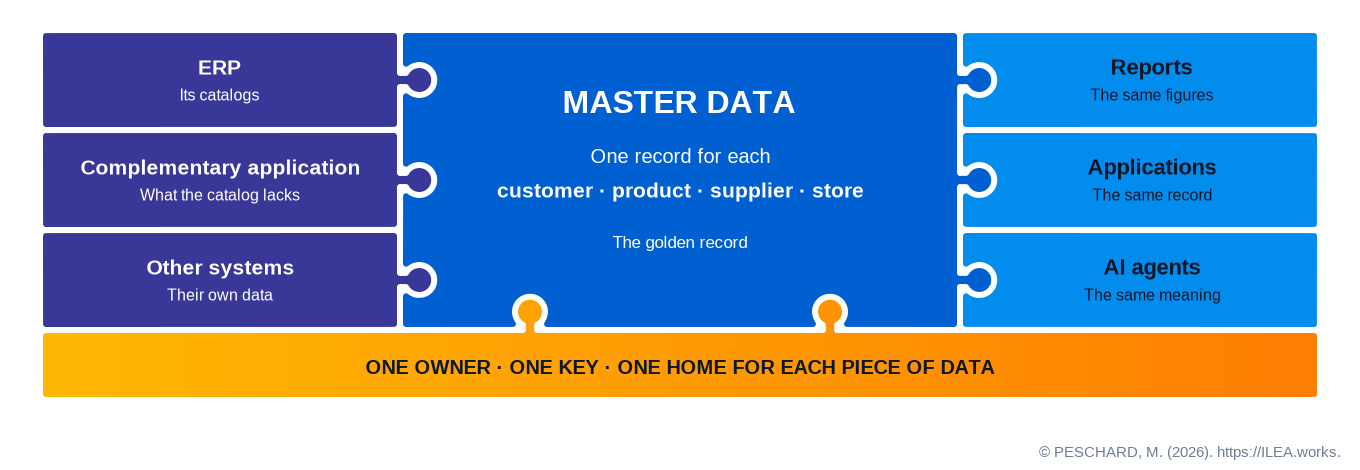
ILEA diagram. Author’s adaptation.[1]
Three kinds of data
Not all data behaves the same way:[1]
| Kind | What it is | Examples | How often it changes |
|---|---|---|---|
| Master data | The things the business deals with | Customers, products, suppliers, stores, employees | Slowly |
| Reference data | The shared lists used to classify | Countries, currencies, units of measure, categories, the calendar | Rarely |
| Transactions | What happens | Sales, orders, payments | All the time |
Every transaction points to master and reference data: a sale has a customer, a product, a store, and a date. If those lists are wrong, every transaction inherits the error.[1]
How to get to one record
That single, trusted record is often called the golden record. Four habits lead to it:[1]
- One owner for each list. Someone in the business answers for the customer list, and someone else for the product list.
- One home for each piece of data. A record can be put together from more than one system, but each piece of data has only one system that writes it; the others receive it from there.
- One key everywhere. Each record has an identifier the whole company uses, and keeps the code it has in each system as a cross-reference.
- Clear rules to recognize duplicates. When two records are the same thing, and which data wins when they differ.
This is not a tool to be installed. Gartner describes master data management as a discipline in which business and IT work together.[2]
Where the record lives: the hub
The single record needs a home that belongs to no application. That home is the canonical layer described in Data layers for analytics: a hub where each system delivers the data it owns, the record is put together, and everyone reads it from there.[1] It is known as an operational data store (ODS): a central place that gathers the data of several operational systems.[3]
In its first version, a hub like this is refreshed once a night. As more applications depend on it, it is kept up to date during the day and serves them through APIs, which the industry calls a digital integration hub.[4] How applications connect to it, through a contract and not by reading its tables, belongs to the Integration domain: see The contract.[1]
Two examples: completing the store catalog
From the author’s experience in a retail chain.[1]
One record, two sources. The ERP owns the store catalog: the code, the name, the address. In this chain, the ERP had no place to keep the coordinates of each store, which are needed to see the stores on a map and to analyze by area. They are captured in a complementary application, and the hub joins both by the store code. The result is one record of each store, with two sources and a single owner for each piece of data.
The history the source does not keep. To compare this year’s sales with last year’s fairly, only the stores that were open in both periods count. That requires knowing when each store opened and whether it was closed for a time, because of a remodeling or a disaster. In this chain, the ERP could not keep those dates. They are captured in the complementary application, each closure with its start and end date, and with them the comparison of “same stores” stops being an estimate.
Three lessons:
- When the source system cannot hold a piece of data, complete the record in the hub. There is no need to customize the system or to give up the data.
- Each system writes only what it owns. The refresh from the ERP never overwrites the data of the complementary application, and the other way around.
- Dates instead of a yes or no. “Closed from this day to that day” allows fair comparisons across any period; a simple “active” mark does not.
In analytics and with AI
In the data layers, master data becomes the shared lists by which every figure is analyzed: the same list of stores serves sales, inventory, and finance. That is why a figure by store means the same in every report.[1]
With AI it matters even more. An agent asked how many customers the company has can only answer well if there is one record for each. Master data provides the nouns of the context layer: the customers, products, and stores that everything else talks about.[1]
To go deeper
Reference and master data management is one of the eleven knowledge areas of DAMA-DMBOK.[5] The TOGAF Standard has a series guide on customer master data management,[6] and ISO addresses the quality of master data in the ISO 8000-100 series.[7] Vendors publish ready-made models for customers and products, which are good starting points, as described in The canonical model.
Next: Where data lives: by use and by shape
References
- Author’s adaptation, from the author’s practice designing and implementing data platforms.
- Gartner. (n.d.). Master Data Management: Build a Strong Process, Framework and Solution. https://www.gartner.com/en/data-analytics/topics/master-data-management
- Amazon Web Services. (n.d.). What is an Operational Data Store? https://aws.amazon.com/what-is/operational-data-store/
- Apache Software Foundation. (n.d.). Digital Integration Hub With Apache Ignite. https://ignite.apache.org/use-cases/digital-integration-hub.html
- DAMA International. (n.d.). DAMA-DMBOK Framework. https://www.damadmbok.org/dmbok-framework
- The Open Group. (2022, April 25). TOGAF® Series Guide: Information Architecture: Customer Master Data Management (C-MDM) (G21B). https://publications.opengroup.org/g21b
- International Organization for Standardization. (2016). ISO 8000-100:2016, Data quality — Part 100: Master data: Exchange of characteristic data: Overview. https://www.iso.org/standard/62392.html